Silkroad.exe Errors
- 1) TempPath error. Update temp-file is damaged.
- 2) BSObj Plugin. Can't create file transfer manager
- 3) Failed to execute Silkroad. [Error code(2)]
- 4) Patching has not finished. Please try again. [Error Code(4)]
- 5) Silkroad pk2 files is damaged. Now silkroad online launcher is closing
- 6) Replacer.exe is not found. Patching has not finished.
- 7) Silkroad Launcher not starting
- 8) Please execute launcher program
- 9) Silkroad Already Executed
- 10) Cannot complete patching because Replacer.exe file is damaged. [Error Code(193)]
1) TempPath error. Update temp-file is damaged.
Symptoms: You cannot update client with last patch, this error popup.
Resolution: Delete folder temppath or delete all files in this folder, after start Silkroad.exe again (As Administrator)

2) BSObj Plugin. Can't create file transfer manager
Symptoms: You cannot update client with last patch, this error popup.
Resolution: Close all clients opened and Bots / Alchemy tools / Loaders and start again.
3) Failed to execute Silkroad. [Error code(2)]
Symptoms: After open Silkroad.exe and press [Start] this error popup
Resolution: You missing file [sro_client.exe], it was damaged or deleted by Antivirus. In your ExaySRO folder you can find Archive with all EXE files, but first read [EXE Files! Read if Antivirus removed!.txt] to add ExaySRO game folder as exception in your antivirus program.![ExaySRO Silkroad Failed to execute Silkroad. [Error code(2)]](https://www.exaysro.com/images/sro_errors/missing_client.png)
4) Patching has not finished. Please try again. [Error Code(4)]
Symptoms: You cannot update client with last patch, this error popup
Resolution: Your internet connection is not stable or server was closed for maintenance. Try to start again Silkroad.exe again (As Administrator) or check website for maintenance notice.![ExaySRO Silkroad Patching has not finished. Please try again. [Error Code(4)]](https://www.exaysro.com/images/sro_errors/disconnect.png)
5) Silkroad pk2 files is damaged. Now silkroad online launcher is closing
Symptoms: After open Silkroad.exe this error popup
Resolution: Your Media.pk2 file is missing or damaged, extract Full client again and start Silkroad.exe again (As Administrator).

6) Replacer.exe is not found. Patching has not finished.
Symptoms: After open Silkroad.exe this error popup
Resolution: You missing file [replacer.exe], it was damaged or deleted by Antivirus. In your ExaySRO folder you can find Archive with all EXE files, but first read [EXE Files! Read if Antivirus removed!.txt] to add ExaySRO game folder as exception in your antivirus program.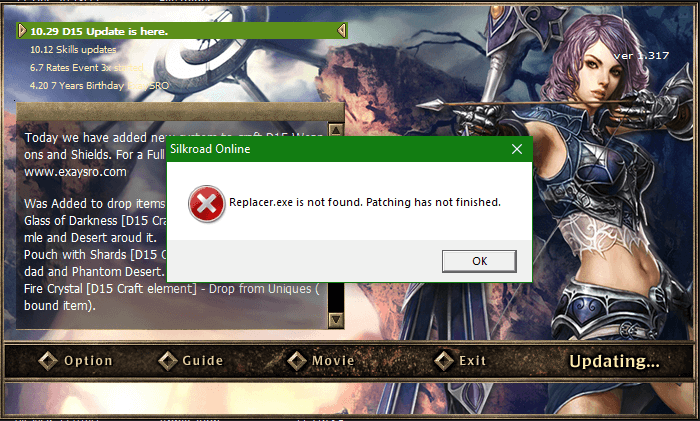
7) Silkroad Launcher not starting
Symptoms: After open Silkroad.exe this error popup
Resolution: There are 3 main problems regarding this error.
a) ExaySRO Server is on Maintenance.
b) Your client is outdated, download Full client from our website.
c) Your IP/ISP is blocked on ExaySRO (there is nothing you can do about this)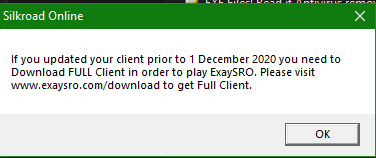
8) Please execute launcher program
Symptoms: this error popup
Resolution: You have started Replacer.exe instead of Silkroad.exe, please start Silkroad.exe again (As Administrator).
9) Silkroad Already Executed
Symptoms: After open Silkroad.exe this error popup.
Resolution: You have already started a client, or your client has crashed but process sro_client.exe is still active, close it from
[Task Manager] or Start as Administrator file SRO_Killer.exe in your game folder, this will close all Silkroad.exe and sro_client.exe on your computer.
Or you can just restart your PC to be sure all has been closed.
Reminder, with Silkroad.exe you can start just 1 client, to have multiclient use any BOT you have (we do not provide any)
or use Loader [edxSilkroadLoader] that can be download from our website.
10) Cannot complete patching because Replacer.exe file is damaged. [Error Code(193)]
Symptoms: You cannot update client with last patch, this error popup
Resolution: Your file [replacer.exe] is was damaged or deleted by Antivirus.
In your ExaySRO folder you can find Archive with all EXE files, but first read [EXE Files! Read if Antivirus removed!.txt] to add ExaySRO game folder as exception in your antivirus program.
